
Design your survey
Assign different survey versions deliberately.
Compare introductions, question variants or experimental conditions by assigning respondents to different paths. Lensym’s Split rules let you set the relative weights and choose how assignments are made.
Weighted Split paths are available on Essential, Expert and Enterprise. Compare plans
Different versions in one survey
Assign respondents to distinct questions, content or sections. Experimental variants can sit within one questionnaire and return to a shared follow-up.
Weights that express the design
Use equal or unequal positive weights across two or more paths. The displayed percentages make the intended allocation available for review.
Two assignment methods
Choose independent weighted Random draws or Balanced allocation based on assignment counts. The choice determines how the next path is selected.
Inside Lensym
Inspect a weighted Split configuration
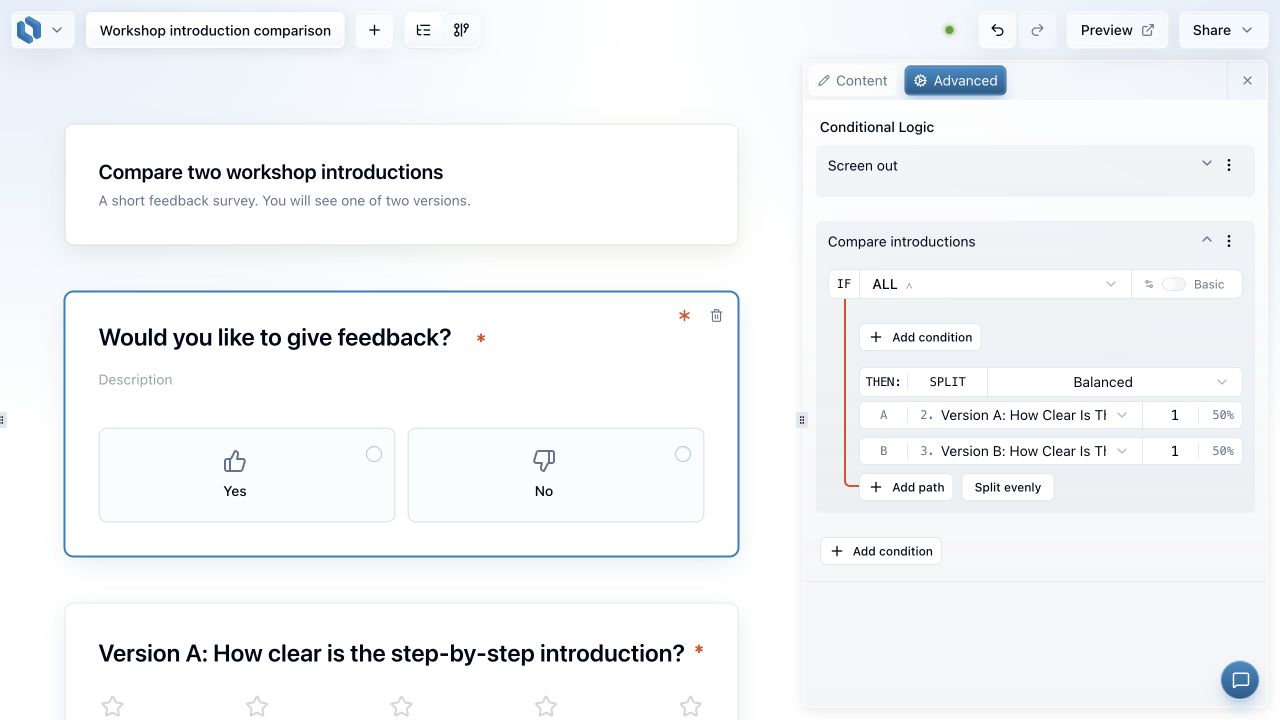
The screenshot shows two workshop-introduction paths, each with a weight of one and a displayed share of 50%. Balanced mode is selected, with controls to add paths or split evenly.
A place for different conditions within the same instrument
Some studies need respondents to encounter different material: two introductions, alternative descriptions or several versions of a question. Lensym’s Split rules assign a response to one of those paths. Conditions can determine who enters the Split, while the paths determine which version comes next.
This keeps the variable material and common follow-up in one questionnaire. Each version can be reviewed in relation to the same screening and outcome questions. A Go To after an earlier version keeps the later version out of that route before both paths rejoin.
Allocation that can match the study plan
Weights describe relative shares. One and one represents an equal allocation; seven and three represents 70% and 30%. More than two paths are supported, and Lensym displays the percentage implied by each positive whole-number weight.
That makes the allocation explicit rather than leaving it hidden in a collection process outside the survey. Equal groups are not the only possible design, and a larger weight does not promise a fixed number of completions. The intended proportions remain a choice the researcher can inspect and document.
Illustrative experimental workflow
Compare two ways of explaining the same policy
A research team wants to compare a short policy summary with a worked example. Respondents should see one explanation before answering the same questions about their understanding and views. The variation belongs in the explanation, while the follow-up provides a common point of comparison.
The team builds two content paths and assigns equal weights. Choosing Random gives each response an independent weighted draw; choosing Balanced would instead manage assignment counts. That methodological choice is made before collection, alongside the sampling and analysis plan. Lensym supplies the routing mechanism, not a conclusion about the policy’s effects.
Define the variation
Each path contains one explanation. The team records what differs between the versions and keeps the intended common questions outside those paths, so the survey structure reflects the comparison.
Choose the allocation method
A Split before the versions uses weights of one and one. Any eligibility conditions are specified separately, and the selected mode matches the method the team intends to report.
Check separation and follow-up
Both routes are tested through to the shared questions. The first version bypasses the second, and returning within the same attempt retains its existing assignment while the setup is unchanged.
Random and Balanced answer different design needs
Random chooses independently for each response according to the weights. It allows the uneven sequences that independent draws can produce, particularly in small samples. It does not alternate predictably between versions or force their counts to remain equal.
Balanced directs the next response to a path furthest behind its weighted share, with random tie-breaking. It counts assignments, including people who later stop answering. The distinction matters when describing the method: Balanced allocation is not the same process as independent random assignment, and neither guarantees equal completed groups.
Assignment is part of a complete respondent journey
A participant needs a coherent experience before and after the assignment. Screening, the selected material and the shared ending all contribute to that experience. Lensym retains the assignment when the same response revisits an unchanged Split, so going Back does not provide another draw.
Preview supports checking each path and its ending without creating real responses. Its temporary Balanced counts are separate from published assignments. The resulting review can establish that the routes behave as intended; sample size, dropout and the interpretation of differences still belong in the study’s analysis plan.
Common questions
- Does Split shuffle the questions in a version?
- No. Split assigns a route. Question-specific order settings are separate, and there is no general control that shuffles the entire survey.
- Does Balanced guarantee equal completed groups?
- No. It balances assignments using the selected weights. Respondents can leave after assignment, so the completed groups can still differ in size.
Ready to set it up?
The documentation covers the controls, settings and worked examples.
Put the variation in your study into a visible survey flow.
Build the versions, choose their weights and review the assignment method. Split paths are available on Essential and above, with Preview for checking each route.
Related features
Conditional survey logic
Give respondents a relevant path through your survey, using conditions based on their answers.
Survey preview and testing
Try your questions as a respondent. Check instructions, required answers, piping and routes before publishing.
Survey analytics
Inspect collection progress, individual responses and question-level summaries while keeping the research context in view.