
Analyse your survey
Take completed responses into your analysis workflow.
Download a dataset for further analysis or a document for reading and reporting. Lensym’s export controls make the format, completion-date range and included response count explicit before you download.
CSV is available on every plan. Excel, PDF and Word require Essential or above. Exporting requires Owner or Admin access. Compare plans
Data and document formats
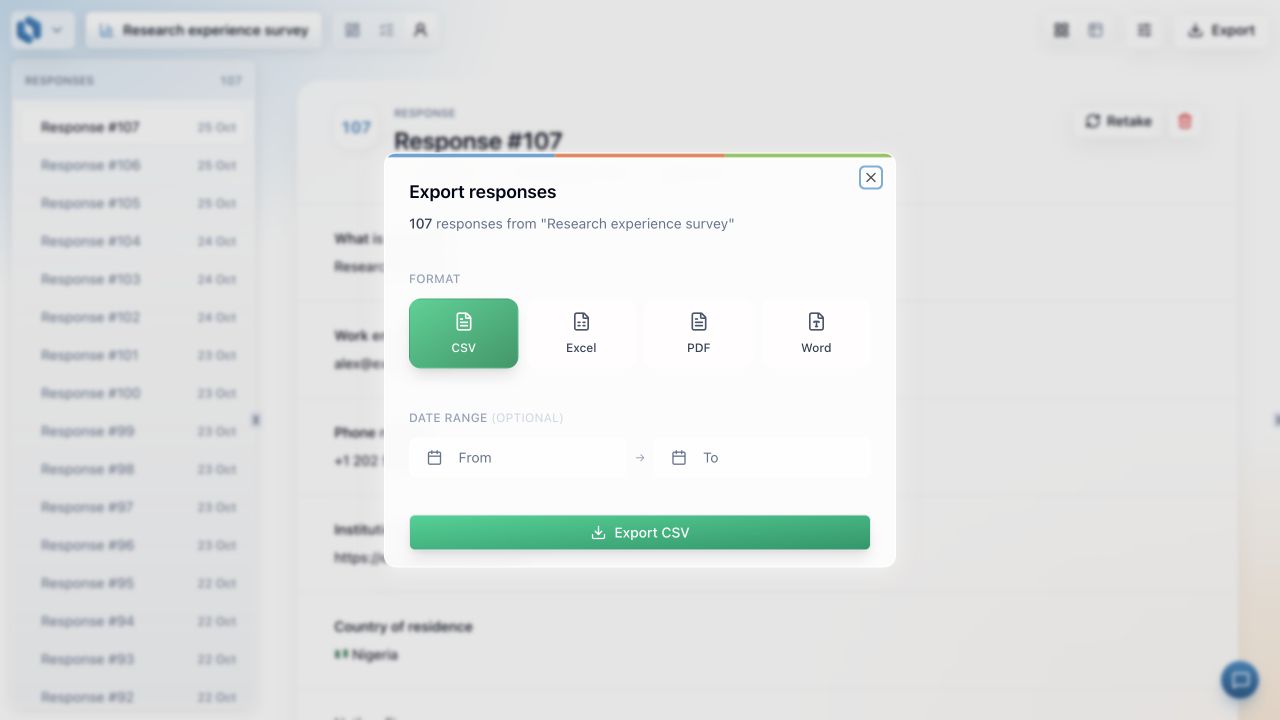
CSV and Excel support dataset work; PDF and Word offer readable document outputs. Choose the form that fits the next stage of the project.
An explicit collection window
The export dialog shows its response count, completion-date controls and timezone. Make the scope of a download clear before it enters an analysis.
A choice for CSV handling
Use the spreadsheet-safe default for readable spreadsheet data or unchanged research data for programmatic work. The choice affects the download, not stored responses.
Inside Lensym
See the export format and date controls
This screenshot shows the export dialog for an example research survey, with CSV selected, Excel, PDF and Word alternatives, an optional date range and the download button.
Outputs for analysis, reading and reporting
A completed survey can support several kinds of work. Numeric answers may enter a statistical analysis, written explanations may need close reading, and a report may require an editable document. Lensym provides CSV, Excel, PDF and Word so the output can match that next task.
PDF and Word offer Table and Individual layouts. One brings responses together; the other organises the document around individual submissions. These are presentations of the recorded responses, while the in-app Questions view remains available for question-level summaries and the dataset remains available for further analysis.
A deliberate choice about spreadsheet handling
Participant text can be interpreted differently by a spreadsheet than by a data-processing script. Lensym makes the export choice explicit. Spreadsheet-safe CSV is the default: it provides readable answers and adds protection to text that could be interpreted as a formula, while plain numeric values remain numeric.
Unchanged research data provides stored values, response metadata and answer timestamps without formula protection. Structured answers appear as JSON within the CSV. This suits programmatic work, but opening the file directly in a spreadsheet can interpret text as formulas. Spreadsheet behaviour varies, so the intended destination matters when choosing the format.
Illustrative analysis workflow
Prepare a course evaluation for quantitative and qualitative review
A course evaluation combines ratings, selected topics and written explanations. The research team wants a dataset for recoding and analysis, while a colleague needs to read longer answers in a document. Both tasks begin with the same completed responses but benefit from different formats.
Lensym’s export choices support those separate uses. The team defines the completion period, checks the response count and chooses the appropriate output. Keeping the extraction choices explicit helps explain which data informed a report and allows the same collection window to be selected again.
Define the dataset
An Owner or Admin selects the completion dates in the export dialog and checks the displayed timezone. Unfinished responses remain outside the download, so the count is compared with completed submissions.
Choose the output for each task
CSV or Excel provides the working dataset. A PDF or Word Individual layout presents responses one at a time for reading; Table brings responses together for comparison.
Preserve and inspect the extraction
The team checks headers and known answers, retains an untouched copy and records its export choices. Recoding and derived variables are added in the analysis workflow with the original answers still available.
A defined set of completed responses
The export dialog defines the download’s scope rather than silently inheriting the analytics sidebar’s filters. It includes completed responses and provides its own completion-date controls. Started, in-progress and abandoned responses are excluded; Preview answers do not create exportable records.
Dates use the timezone displayed in the dialog and include both endpoint days in full, including daylight-saving transitions. A single-day window can therefore be selected as the same From and To date. The response count and download use those same boundaries, giving you a concrete selection to document alongside the file.
Keep the meaning of the answers through the handoff
An export is the beginning of another workflow, not the end of interpreting the questionnaire. A blank answer can reflect an optional question or a bypassed route. A structured answer may need its components separated for analysis. Individual responses remain useful for checking what a particular record represents.
Both CSV choices leave stored responses unchanged. Keeping an untouched download, recording the extraction settings and checking known answers gives the team a reference before recoding or calculating new variables. Lensym provides the responses and their selected scope; the analysis can then make its transformations explicit.
Common questions
- Can an Editor download responses?
- No. Exporting requires Owner or Admin access. A plan that includes Excel or document exports does not grant that permission to an Editor or Viewer.
- Is there a separate JSON export?
- No. The available formats are CSV, Excel, PDF and Word. The unchanged-data CSV represents structured answers as JSON values within its cells.
Ready to set it up?
The documentation covers the controls, settings and worked examples.
Carry the answers into the work that follows collection.
Start with CSV on any plan, or use Excel and document formats on Essential and above. Define the period, inspect the file and keep the original data available.
Related features
Survey analytics
Inspect collection progress, individual responses and question-level summaries while keeping the research context in view.
Answer piping and expressions
Reuse earlier answers in later questions, or calculate values from them without asking respondents to repeat information.
Real-time collaboration
Build a survey together and give each collaborator the access they need to edit, review or manage it.