
Conditional logic
Adding a rule
Create a conditional rule from the Advanced panel.
A rule checks answers and chooses where the respondent goes next. Start from the node where the decision should happen.
- Select the source question, then open Advanced.
- Choose Add condition to start configuring its rule.
Open Advanced
Select the source node, choose Advanced, and find Conditional Logic.Add and configure a condition
Add a rule if none exists. Choose the current or an earlier question, an operator, and a comparison value when that operator needs one.Choose the action
Set THEN: GO TO and a later destination, or choose Skip where your plan supports it. A destination inside a section is not a valid Go To target.Try both paths
In Preview, enter an answer that matches and one that does not. Confirm the question sequence in each case.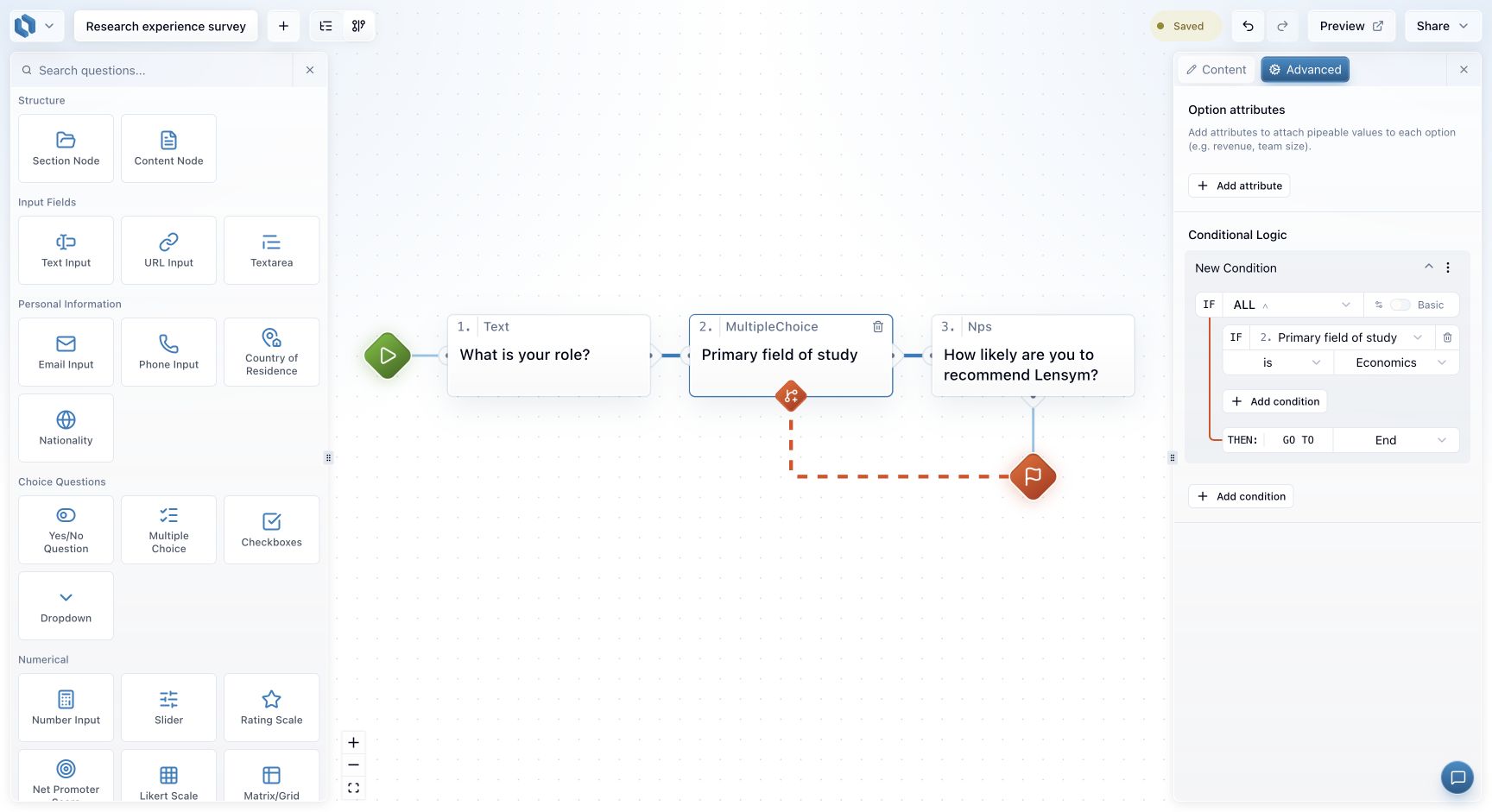
For example: on “Primary field of study”, choose is → Economics → GO TO → End. People who choose another answer follow the normal path unless another rule applies.
Use ALL or ANY to combine checks. In graph mode you can also drag a branch to create the path first.
Place the decision after its inputs
A rule can use the current answer and earlier answers. It cannot depend on a question the respondent has not reached yet. For example, if routing needs both attendance and experience, put the decision after those inputs have been collected.
Give the rule a name that describes its purpose, such as “Non-attendees to general feedback”. The name helps you recognise the rule later; the conditions and destination determine its behaviour.
Check the route that does not match
A rule is not a complete flow by itself. When its condition is false, the respondent normally follows the regular connection unless another matching rule selects a destination. Check that this default route is useful and does not accidentally show a question intended for a different group.
Before adding another rule, preview your first one with a matching answer, a different answer and an optional blank answer where relevant. Then use nested groups if the next requirement combines alternatives, or Split when you want to assign versions rather than select a route from an answer.